• Logs
  • English
    • Nederlands
  • Documentation
  • Frequently Asked Questions
  • Downloads

How do I make a link open in a new tab?

by poppy | Mar 19, 2021 | Uncategorized

Via the content editor:


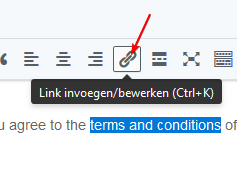
  1. Highlight the text you want to add a link to and click on the link icon:
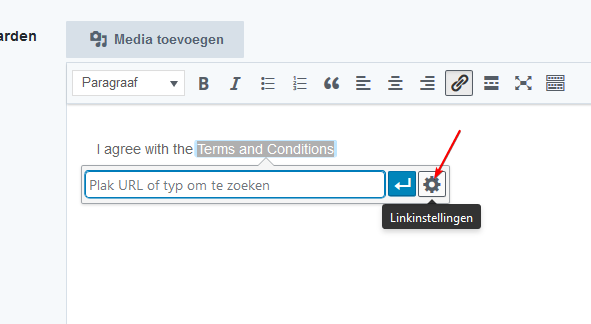
  2. Click on the Gear icon:
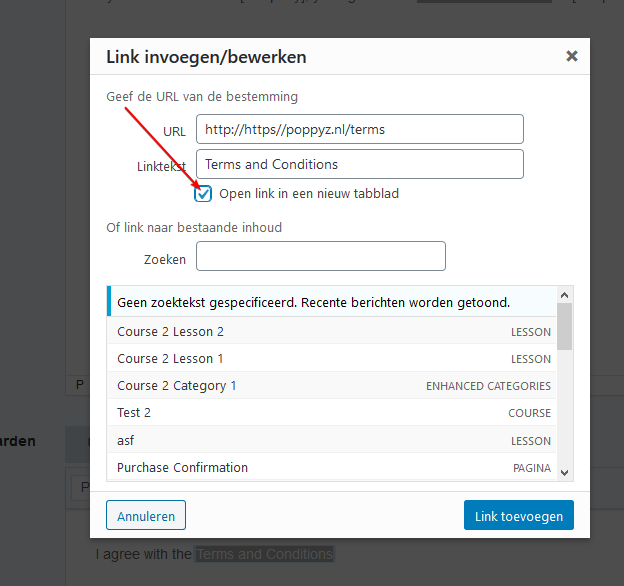
  3. Check the new tab option:


Getting started

  • Installing the plugin
  • Updating the plugin
  • Default pages
  • Email Settings
  • Issuing Invoices
  • Landing Page Settings
  • WordPress theme
  • Importing Default Setup and Styles
  • Standard Texts
  • Mailing Lists

Payments

  • Payment Options
  • Chargebacks and Refunds
  • Tax Rates by Country

Courses

  • Adding courses
  • Module pages
  • Adding lessons
  • Resizing Images
  • Adding tiers

Frontend

  • Registration, Login and Edit Profile
  • Customize ‘Reset Password’ page
  • Viewing a course
  • Buying a Course
  • Progress List
  • Account Page
  • Customize login page

Divi integrations

  • Installation

Various

  • Managing Individual Users

Integrations

  • Plug & Pay Integration
  • MoneyBird
  • Google Analytics Settings